


Trucker GPS & Maps | CargoTour
4.415.00 Reviews
App Specs
- Version
- 2604.2
- Updated On
- License
- Free
- Downloads
- 100,000+
- Developer
- Expluribus Software
- Categories
- Maps & Navigation
- Platform
- Android
Screenshots
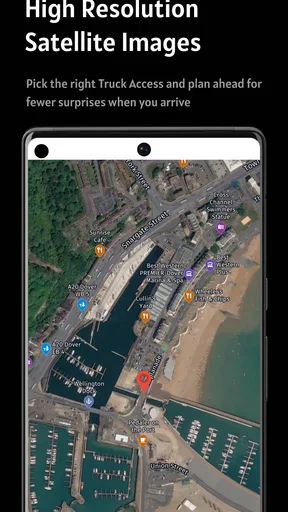
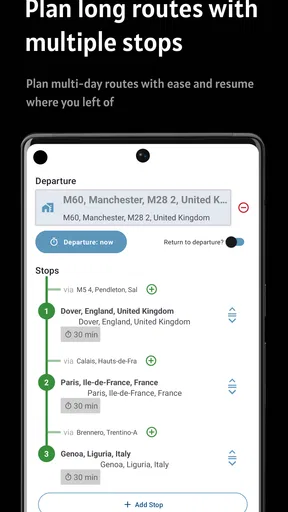
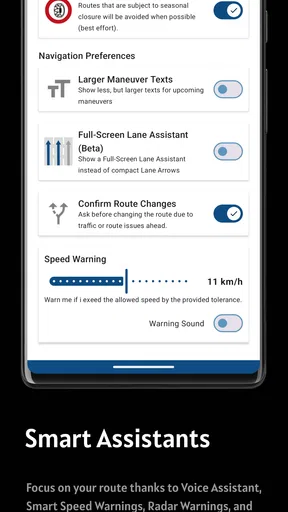
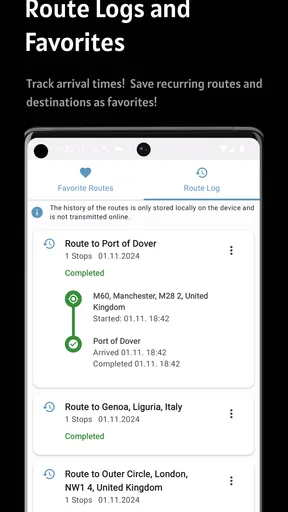
 Analysis by AppCompare
For a truck driver, a navigation app has to earn its place through the ordinary miles, not just look impressive on the first trip. I’d judge CargoTour by whether it helps me plan a workable route, make sensible stops, and cope when a journey changes. Its focus is useful: this is a free Maps & Navigation app from Expluribus Software, aimed at truck travel rather than general commuting. The key question is whether that focus makes it worth returning to after the novelty wears off.
What matters once the first trip is over
A truck-specific route planner can be valuable before the engine starts, when there is time to check a route against the vehicle and the job. CargoTour’s combination of route planning, truck navigation, toll estimation, and offline maps points to a practical workflow: plan around the trip’s constraints, consider likely costs, and prepare maps before connectivity becomes unreliable. Those parts are more useful as a routine than as features to admire once.
I would not treat a truck-routing app as an excuse to stop checking the route. Vehicle restrictions, roadworks, local access rules, and the details of a delivery can change what is sensible on the ground. The safer habit is to use the planner as a planning aid, review the proposed route before departure, and follow road signs and current restrictions while driving. No navigation screen can take responsibility for whether a particular road is suitable for a particular load.
A realistic day on the road
Imagine leaving early for a delivery in an unfamiliar area, with a toll road on one possible route and a weak signal expected later in the journey. I’d use the planning stage to compare the route options and estimate toll costs, then prepare the relevant offline map before setting off. If the schedule shifts, I’d review the revised route while parked rather than trying to sort out several changes in moving traffic. That small change in workflow matters: preparation can reduce last-minute fiddling without pretending that a map can predict every delay.
Offline maps are especially helpful as a backup, not a promise that every part of a trip will work exactly as it does online. Before relying on them, I’d check that the area I need is available offline and that the map is ready on the device. This is a useful step for rural stretches, depots with poor reception, or a route through an unfamiliar region. It also sets a realistic expectation: offline access helps with map availability, but it should not be confused with live traffic information.
Who is likely to keep using it?
CargoTour makes the most sense for drivers who regularly plan truck journeys and want navigation considerations, toll planning, and offline maps together. It may also suit someone who is trying a truck-focused app for the first time, since the app is free to download and rated for Everyone. Its average rating is 4.4 from around 1.6 thousand ratings, and it has over 100 thousand installs; those figures suggest it has found an audience, though they cannot tell me whether its routes suit a particular truck, region, or work pattern.
It is less compelling if you only need simple directions for occasional car trips. A mainstream navigation app may be more convenient for that job, especially if you rely heavily on live traffic, familiar place searches, or an interface you already know. Likewise, drivers who need a very specific fleet workflow should check that the app fits their daily process before depending on it. A truck-focused label alone does not guarantee that every specialized operational need is covered.
Worth Reading Before You Choose

EA SPORTS FC Mobile 26 Is a Bigger Football Game, but It Takes Time

Flipboard Shows What News Apps Must Do Beyond the Feed

Switching to Android Auto Means Rethinking Your Driving Routine

Google Calendar Makes a Crowded Week Easier to Manage

Ludo King Makes the Most of the Minutes Between Plans

Baby Panda World Brings Quick Play to Modern Phones, but Its Game Library Feels Busy
Keeping the routine light
The difference between a helpful tool and an irritating one is often the setup and the habit around it. I’d keep the app’s route details current for the vehicle and load, check toll estimates when choosing between alternatives, and download maps before entering a known dead zone. I’d also avoid making route edits while driving. These are simple practices, but they make the app’s truck-oriented planning more useful and reduce the temptation to treat an estimate or suggested route as a final answer.
There is a maintenance trade-off too. Offline maps need attention before a trip, and route plans can become stale when a delivery changes or a stop is added. That is not unique to CargoTour, but it affects whether the app remains helpful month after month. If you tend to leave planning until the last minute, a tool with extra preparation steps may feel like another chore. If you already review routes before departure, those steps can become part of the same routine.
First Impressions and Ease of Use
When I first fired up Trucker GPS & Maps | CargoTour, I was greeted with a clean, intuitive interface. The developers clearly understand that when you're on the road, simplicity is key. The main dashboard is uncluttered, with large icons that are easy to tap even when you’re bouncing along a less-than-perfect highway.
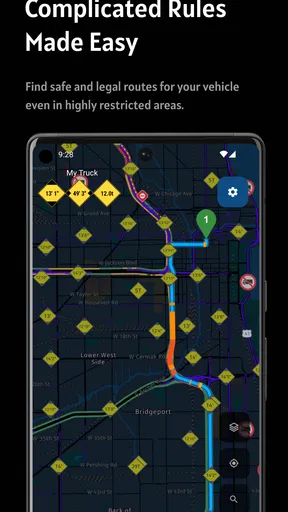
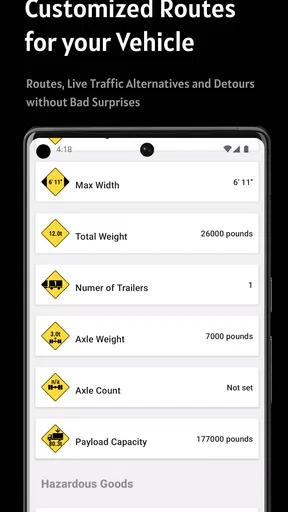
Setting up your profile is a breeze. You can input your vehicle’s dimensions, weight, and cargo type, which is a game-changer. The app uses this info to ensure you’re only routed on roads that can accommodate your rig. No more white-knuckle moments wondering if you’re about to encounter a low bridge or a weight-restricted road.
Features That Stand Out
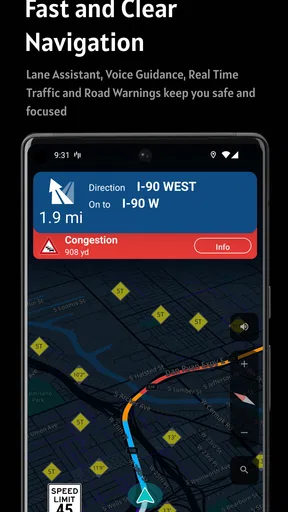
One of the standout features for me is the app’s real-time traffic updates. The app constantly monitors traffic conditions and suggests alternative routes if it spots congestion ahead. I’ve tried other GPS apps before, and this one seems to have an edge in terms of speed and accuracy.
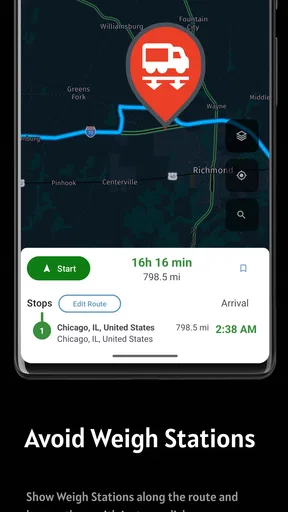
Another nifty feature is the points of interest tailored specifically for truckers. Whether you’re looking for a truck stop, weigh station, or a place to grab a decent meal, CargoTour has you covered. The app even includes user reviews, so you can avoid that greasy spoon diner that left your buddy with an upset stomach last week.
The app also integrates with most major fuel card providers, so you can easily find fuel stations that accept your card and offer the best prices. This can add up to significant savings over time, especially if you’re on the road as much as I am.
Navigation Performance
The navigation itself is smooth and reliable. Voice-guided turn-by-turn directions keep your eyes on the road and your hands on the wheel. I appreciate the clear, concise instructions without too much chatter. Sometimes less is more, especially when you’re navigating through a busy city.
Map updates are frequent, which is crucial. There’s nothing worse than relying on outdated maps and finding yourself on a road that’s been closed for months. CargoTour seems to keep its data fresh, which is a huge plus in my book.
Room for Improvement
No app is perfect, and CargoTour is no exception. I’d like to see more customization options for alerts. The app tends to be a bit overzealous with notifications, which can be distracting. A bit more control over what alerts come through would be welcomed.
Additionally, while the app is generally snappy, I’ve occasionally experienced lag when loading complex routes with multiple stops. It’s not a deal-breaker, but it’s something to be aware of if you’re planning a particularly intricate journey.
Value, costs, and the long view
The free starting point makes it easy to try CargoTour on a route that is representative of your usual work rather than judging it after a quick test around town. I would check how it handles the kinds of journeys I actually make: a multi-stop day, a longer run with toll choices, or a trip through an area where I may need offline maps. That is a better test of lasting value than simply opening the map and browsing around.
The app includes in-app purchases, with items ranging from $2.49 to $109.99. That is a broad range, so I’d look carefully at what any purchase unlocks and whether it solves a recurring need before paying. A one-off convenience is less persuasive than something that saves time repeatedly in my own workflow. Drivers who only need occasional directions may prefer to stay with a familiar free alternative rather than pay for features they rarely use.
For comparison, general-purpose navigation apps tend to be the natural choice for car trips and everyday destination searches. CargoTour’s appeal is the truck-oriented planning angle and its inclusion of toll estimation and offline maps. Those are meaningful distinctions when planning a haul, but they do not automatically make it a better choice for every driver. I’d keep a second trusted navigation option available for cross-checking unfamiliar routes, particularly when access restrictions or last-minute road changes matter.
Where the routine can wear thin
Truck routes are only as useful as the information entered and the attention given to the result. If vehicle details are incomplete or a load changes, a route that looked suitable at the planning stage may no longer fit the real trip. I’d treat profile setup as something to verify, not a task to rush through once and forget. Rechecking it when the vehicle or job changes is a small maintenance burden with a practical purpose.
There is also a difference between a route-planning tool and a complete work-management system. CargoTour can help with navigation-related decisions, but I would not expect it to replace the driver’s own checks, dispatch instructions, or other tools used to manage a delivery. That distinction is important for people hoping one app will handle every part of a trucking day. It is better suited to supporting the route than to becoming the entire workflow.
The current version is 2602.2, and it runs on Android 7.0 or later. That makes the minimum system requirement worth checking before installing it on an older device. Since a navigation app is most useful when it is ready before departure, I’d also test it on the phone I actually use for work and make sure the screen and controls suit the way I mount and operate that device. The app is free to install, but its age rating is Everyone; neither point should replace checking whether it fits the demands of a professional route.
Final Thoughts
Overall, Trucker GPS & Maps | CargoTour is a solid choice for anyone who spends a significant amount of time behind the wheel of a truck. It combines essential navigation features with truck-specific tools that make life on the road smoother and more efficient. There’s room for improvement, sure, but the benefits far outweigh the minor drawbacks.
If you’re a trucker looking for a reliable co-pilot, give CargoTour a spin. It might just become your new favorite travel companion. Safe travels, and happy hauling!
Pros
- Accurate real-time traffic updates.
- User-friendly interface for quick navigation.
- Customizable route options for trucks.
- Offline maps availability.
- Comprehensive POI database for truckers.
Cons
- Limited free features.
- Occasional map loading delays.
- High battery consumption.
- Subscription required for premium features.
- Limited compatibility with older devices.
FAQs for Trucker GPS & Maps | CargoTour
What features does Trucker GPS & Maps | CargoTour offer for truck drivers?
Trucker GPS & Maps | CargoTour provides specialized navigation features tailored for truck drivers. It includes truck-specific routes that consider vehicle size, weight limits, and road restrictions. Additionally, it offers real-time traffic updates, fuel station locations, and rest area information, ensuring a more efficient and safe journey for truckers.
Is Trucker GPS & Maps | CargoTour available for both Android and iOS devices?
Yes, Trucker GPS & Maps | CargoTour is available for download on both Android and iOS platforms. Users can find the app on the Google Play Store for Android devices and the Apple App Store for iOS devices, ensuring compatibility with a wide range of smartphones and tablets.
Does Trucker GPS & Maps | CargoTour require an internet connection to function?
While Trucker GPS & Maps | CargoTour can function offline using downloaded maps, some features like real-time traffic updates and live weather conditions require an internet connection. It's recommended to download necessary maps in advance and ensure connectivity for optimal performance and updated information.
Are there any subscription fees or in-app purchases within Trucker GPS & Maps | CargoTour?
Trucker GPS & Maps | CargoTour offers both free and premium versions. While the basic features are available for free, users can opt for a subscription to access advanced features like ad-free navigation, enhanced map details, and premium customer support. In-app purchases may also be available for additional functionalities.
How does Trucker GPS & Maps | CargoTour ensure route safety for truckers?
Trucker GPS & Maps | CargoTour prioritizes safety by providing routes that consider truck-specific restrictions such as height, weight, and hazardous material regulations. The app continuously updates with the latest road conditions and alerts users to potential hazards, ensuring safer travel for truck drivers.


